
Post-Processing Tips After Using Artificial Light in Dog Photography
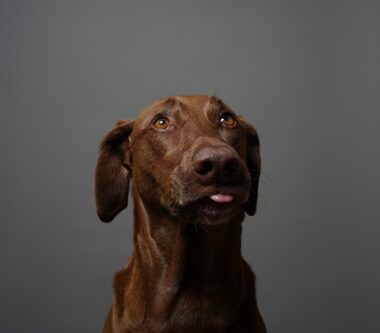
When utilizing artificial light in dog photography, post-processing adjustments are vital to achieving optimal results. The first step in your editing workflow should focus on correcting exposure and white balance. It’s crucial to assess your image critically; if your dog appears washed out, you may need to lower the exposure. On the contrary, if shadows are too dark, consider increasing exposure slightly. A useful technique is to use the histogram tool to gauge lights and darks. Adjust the color temperature using a slider to ensure your dog’s fur matches its natural color. This correction can help avoid the dull appearance that often results from mixed lighting sources, especially where artificial lights are used. Furthermore, utilize software with advanced color grading tools to enhance the vibrancy of your dog’s fur while ensuring that facial features are still clear. It’s also worth mentioning that applying selective color adjustments can add depth to the image, making it more engaging. In refining your overall image quality, always keep in mind the natural look versus overly edited appearances, which can detract from the subject’s charm.
Another critical tip is to leverage the noise reduction features available in various editing programs. When shooting with artificial light, higher ISO settings often lead to noise and grain in images. To minimize this, apply noise reduction during your editing process, but be careful not to overdo it as this can result in a soft image. Instead, aim for a balance where the detail is retained while the noise is less intrusive, especially in the background. You may also want to sharpen your image to ensure that the details of your dog, particularly the eyes and fur texture, stand out. A combination of sharpening and noise reduction can greatly enhance the overall clarity without sacrificing quality. Furthermore, consider cropping your images if a subject is slightly off-center, or if unnecessary background elements distract from your dog. A well-executed crop can also help improve composition, drawing the viewer’s focus toward the dog. Keep essential aspects such as the dog’s behavior and unique qualities in mind as you crop and edit, ensuring these features shine through the finished product.
Color Correction and Enhancement
After addressing exposure and noise, focus on applying color correction techniques to enhance your dog photographs. Often, artificial lights can cast an unnatural hue over the image. Use adjustment layers or tools to target specific colors; bring out the natural shades of your dog’s fur, ensuring they appear vibrant yet realistic. Pay special attention to the balance between warm and cool tones. If shadows appear too blue due to artificial light, consider adding warmth to achieve a more pleasing tone. It’s beneficial to view the image under various lighting conditions while editing to ensure consistency across different screens. Also, consider utilizing filters that can adjust overall color tones if subtle adjustments prove insufficient. Remember, a gentle touch often results in a more natural final image. You can also blend different layers using opacity settings, allowing for a unique touch without overwhelming the image. Additionally, applying a slight vignette can draw attention to the subject by darkening the edges of the image, which subtly enhances its focus.
Another vital post-processing step is to pay focus to the background. A busy or distracting background can take away from the beauty of your main subject, the dog. You can either blur the background through lens blur effects or utilize selective focus during the editing process. This technique helps emphasize your dog’s features and expressions while minimizing distractions behind. If minor tweaks are necessary, consider adjusting the brightness or contrast of the background to make it less prominent. Additionally, if the background contains unwanted elements that challenge the aesthetic appeal, consider utilizing cloning or healing tools to remove these distractions entirely. A clean background can drastically enhance the overall look and feel of the photograph, allowing the dog to shine. As you work through these edits, evaluate the overall composition and ensure that the changes support an engaging visual narrative that emphasizes your dog’s personality. Don’t forget to consider lighting adjustments that might improve how your dog interacts with the environment captured in the photo.
The Role of Saturation and Contrast
Adjusting saturation and contrast effectively can significantly enhance your dog photographs captured with artificial light. Boosting saturation can bring vibrancy to your photos; however, avoid excessive boosting which can lead to unrealistic colors. Use selective color adjustments on the dog itself rather than applying global saturation increases that might distort the image. A targeted increase in saturation can transform a flat image into something lively, showcasing the personality and charm of your dog. In parallel, contrast plays a crucial part in defining shapes and features. Increasing contrast can improve depth within your image, making the dog stand out more prominently against its background. Experiment with the contrast settings and monitor how they affect the overall composition. Aim for a look that highlights your dog’s expressions and subtle fur details without leading to harsh shadows or blown-out highlights. Through careful manipulation of these settings, you can develop a balance that preserves the natural essence of your dog portrait while making it visually compelling. Keep in mind that every dog’s appearance may require different treatment, so always adapt your editing process based on the individual subject.
Another actionable tip focuses on creating a cohesive collection when editing multiple images taken during the same session. Employ batch editing techniques to maintain consistency in exposure, color grading, and tone across all images. This approach is especially helpful if you photographed the same dog in various poses and settings, ideal for building a photobook or a digital portfolio. A consistent look across all images not only enhances the overall aesthetic but also solidifies your unique photographic style. When executing batch edits, make sure to apply adjustments that suit the group as a whole while allowing for selective editing when necessary. This selective process can involve refining exposures on a per-image basis, particularly if lighting varied among shots. Remember, however, that while consistency is key, individual character must shine through in each photo. In doing so, ensure equal focus on your editing techniques without losing sight of each dog’s unique pose or personality, as enhancing individual characteristics can create a more engaging viewer experience that captures attention and leaves a lasting impression.
Final Touches for Polished Images
Lastly, don’t overlook the final touch-ups that can transform a good photo into an exceptional one. This may include adding a subtle sharpening effect to bring out the details in the dog’s fur and eyes, making the photo pop. Experiment with the sharpening tools, but avoid excessive sharpening, which can create unwanted halo effects around edges. Instead, strive for clarity that contributes to the image’s charm. Documenting your editing process can be beneficial; it helps refine your technique over time as you learn what works best for each type of photograph. Moreover, consider creating themed presets that can speed up your future editing endeavors while ensuring a signature style. Additionally, always save your original and edited files in separate layers or folders to maintain a backup for future adjustments. Reviewing your techniques regularly can refine your skills and your craft in dog photography. Recognize that post-processing is as much an art form as photography itself, so embrace the learning process. Each image you edit presents an opportunity to explore creativity while delivering a polished final product.
Using artificial light in dog photography offers magical results, but it’s essential to perfect your post-processing techniques afterward. By following these tips, you can produce stunning images that capture the joy and personality of your furry friends. Always remain open to exploring different editing tools and techniques. Engaging in continuous learning will help you stay updated and sharpen your skills as a dog photographer. Utilize the advanced features in editing software but remember to keep the process simple, especially if you’re still mastering your techniques. Each dog possesses its unique character, and your editing choices should reflect that individuality. Highlighting specific features, colors, or textures that make each dog special will make your photographs resonate more with viewers. Consider seeking feedback from other photographers or joining online forums to gain insights into various editing strategies. Sharing your work and process can open doors to constructive criticism and innovative ideas. In conclusion, effective post-processing after utilizing artificial light can significantly enhance your dog portraits. Implement these strategies to create captivating images that both highlight your subject and showcase your unique photographic style. There’s always room for improvement, so keep shooting and editing with passion!